Skip to content
  • Pricing

Document layout analysis that understands any page

Before a single character can be read, the AI needs to understand the structure of the page — where the text blocks are, where each line sits, where tables, columns, and marginalia begin and end. Transkribus does this automatically for every document, producing pixel-accurate coordinates for every detected element.

AutomaticPage segmentation
Pixel-levelCoordinate accuracy
PAGE XMLStandard export format
RegionsDetect text blocks, images, tables
BaselinesPrecise line-level coordinates
StructureHeadings, paragraphs, marginalia
ExportPAGE XML, searchable PDF, ALTO

See layout analysis in action

The AI scans the document and detects every structural element — text regions, individual baselines, and annotations. Toggle element types on and off to explore the detected layout.
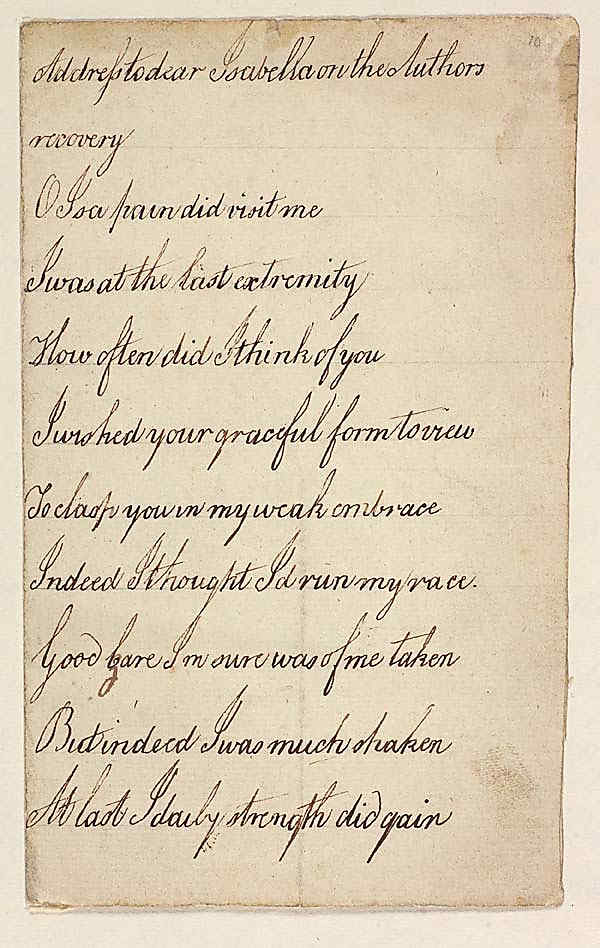
Document with layout analysis overlay
Layout Elements

Page Segmentation

Automatic region detection for any document

Transkribus automatically segments every page into structured regions — text blocks, images, tables, separators, and decorations. The AI handles complex layouts that defeat simple column detection: multi-column text with varying widths, marginalia alongside main text, interlinear annotations, and text that wraps around illustrations.
Detects text regions, image regions, table regions, and separators
Handles multi-column layouts, mixed orientations, and nested regions
Works on handwritten, printed, and mixed documents from any century
Runs automatically during text recognition — no manual zoning needed
Structural regions labeled as heading, paragraph, page number, marginalia

Baseline Detection

Pixel-accurate baselines for every text line

Baselines are the foundation of handwriting recognition in Transkribus. The AI traces the exact path each line of text follows — including curved, slanted, and irregular handwriting. Every baseline stores a polyline of coordinate points that precisely map text to the original image. This is what makes Transkribus output spatially linked to the source: you always know exactly where on the page each word was found.
Polyline baselines follow the exact curvature of handwriting
Each baseline links recognized text to its pixel coordinates
Handles slanted writing, curved lines, and irregular spacing
Coordinates exported in PAGE XML and ALTO format
Essential for searchable PDF generation with aligned text layers

Table structure detection

Table layout analysis goes beyond text regions — it detects rows, columns, headers, and individual cells. Train custom table models for your specific document layouts.
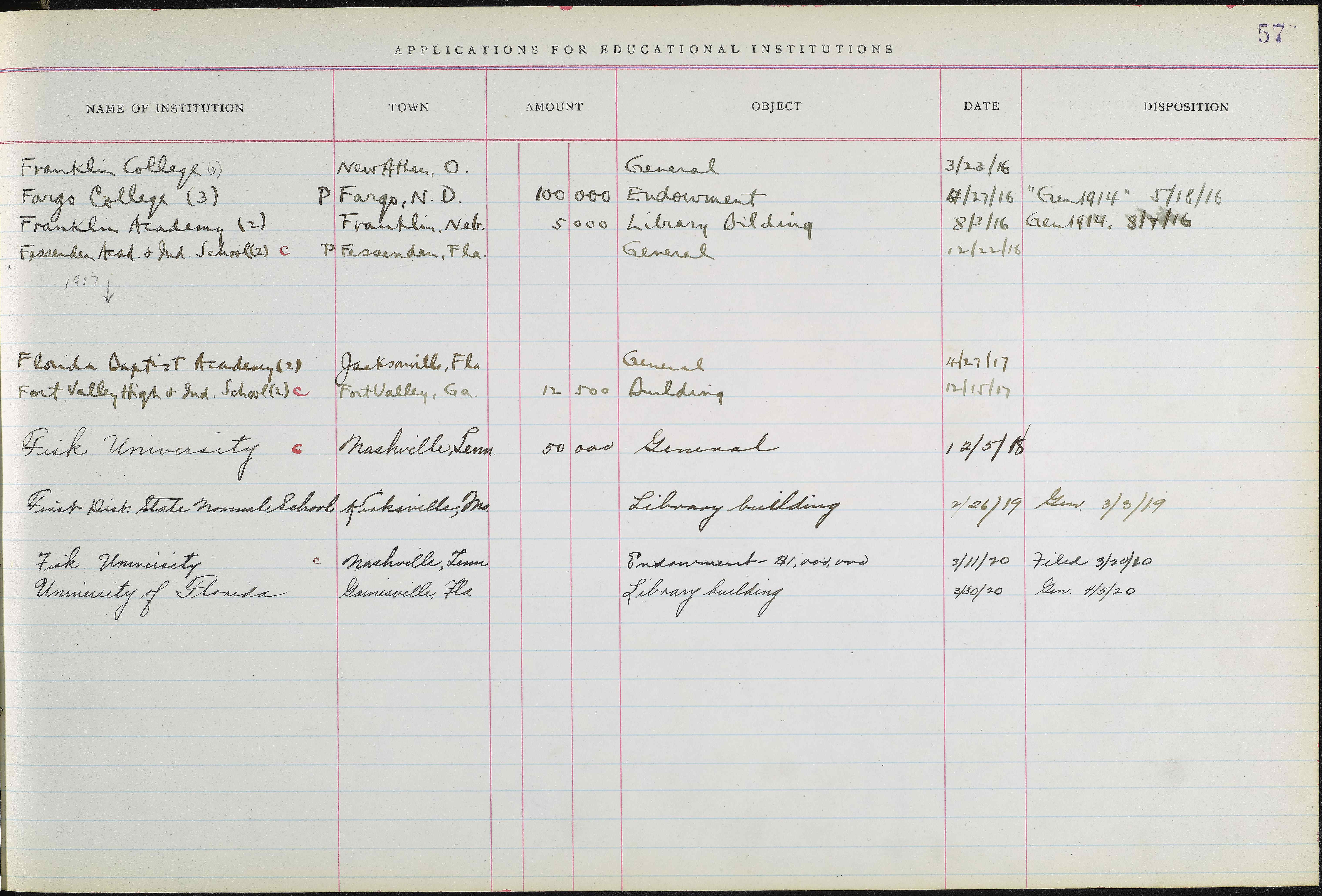
Document with detected table structure
Extracted Table Data
InstitutionTownAmountObjectDateDisposition
Franklin College (6)New Athen, O.General3/23/16
Fargo College (3)Fargo, N.D.100,000Endowment4/27/16Gen 1914, 5/18/16
Franklin Academy (2)Franklin, Neb.5,000Library Building8/3/16Gen 1914, 8/7/16
Fessenden Acad. & Ind. SchoolFessenden, Fla.General12/22/16
Ferris Institute (2)Big Rapids, Mich.50,000Buildings2/12/17
Findlay College (2)Findlay, O.100,000Endowment5/23/17Gen 1914, 5/28/17
Fairmount CollegeWichita, Kan.200,000Endowment6/7/176/14/17
Franklin CollegeFranklin, Ind.50,000General9/13/17Gen 1914, 9/17/17
Fisk UniversityNashville, Tenn.1,000,000Endowment6/14/18
Friends UniversityWichita, Kan.200,000Endowment6/20/18Gen 1914, 8/8/18

Export Formats

Coordinates you can use everywhere

Every layout element Transkribus detects comes with full coordinate data. Export in industry-standard formats for use in digital humanities tools, library systems, or your own processing pipeline. Searchable PDFs align the recognized text layer with the original image using these coordinates — making every word clickable and searchable.
PAGE XML — the standard for document layout with polygon coordinates
ALTO XML — widely used in library and archive systems
Searchable PDF — text layer aligned with image coordinates
TEI-XML — with facsimile links to source regions
Plain text, DOCX, and Excel for simpler workflows

The Editor

Edit and correct layout in a visual editor

Transkribus includes a full visual editor for layout corrections. Adjust region boundaries, merge or split text lines, reassign baseline coordinates, annotate structural regions as headings or marginalia, and correct reading order. Everything you change is reflected in the exported coordinates.
Drag region boundaries and baseline points visually
Merge or split text regions and lines
Assign structural tags: heading, paragraph, marginalia, page number
Correct reading order across complex multi-column layouts
Changes are saved and reflected in all exports

Built for handwriting

OCR layout analysis that works on historical documents

Most document layout analysis tools are designed for modern printed documents with clean, predictable layouts. Transkribus was built for the hard cases: centuries-old handwriting with irregular line spacing, degraded paper, bleed-through ink, mixed orientations, and unpredictable structure. Our AI models have been trained on millions of historical document pages.
Handles degraded, stained, and damaged documents
Works across all centuries and handwriting styles
Manages bleed-through, show-through, and low-contrast text
Detects baselines on slanted, curved, and irregular handwriting
500,000+ users processing historical documents daily

Try document layout analysis free

Upload your documents and see the AI detect every region, baseline, and structural element. No setup, no coding — just upload and go.

AutomaticNo manual zoning
PAGE XMLStandard coordinates
Free50 credits every month