Extract structured data from any document
Research and digitization projects need more than readable text — they need structured data. Names, dates, places, amounts, relationships. Transkribus combines AI text recognition with table extraction, field models, and entity tagging to turn handwritten and printed documents into structured datasets ready for analysis, databases, and spreadsheets.

Three ways to extract data from documents
Different document types need different extraction methods. Transkribus offers all three — and they can be combined.

Table recognition
Detect rows, columns, and cell boundaries in tabular documents — parish registers, census records, tax rolls, ledgers. Each cell becomes a data point. Export the entire table as a spreadsheet or XML.

Field extraction
Train models to find and extract specific fields from structured documents — dates, names, reference numbers, amounts. Works on forms, index cards, certificates, and any document with repeating structure.

Entity tagging
Tag persons, places, dates, and custom entities in running text. Tags become searchable metadata. Export as TEI-XML or filter tagged entities as structured data for your research database.
See table extraction in action
Transkribus detects the grid structure of tabular records and extracts each cell into a structured spreadsheet — ready for your database, genealogy software, or research pipeline.
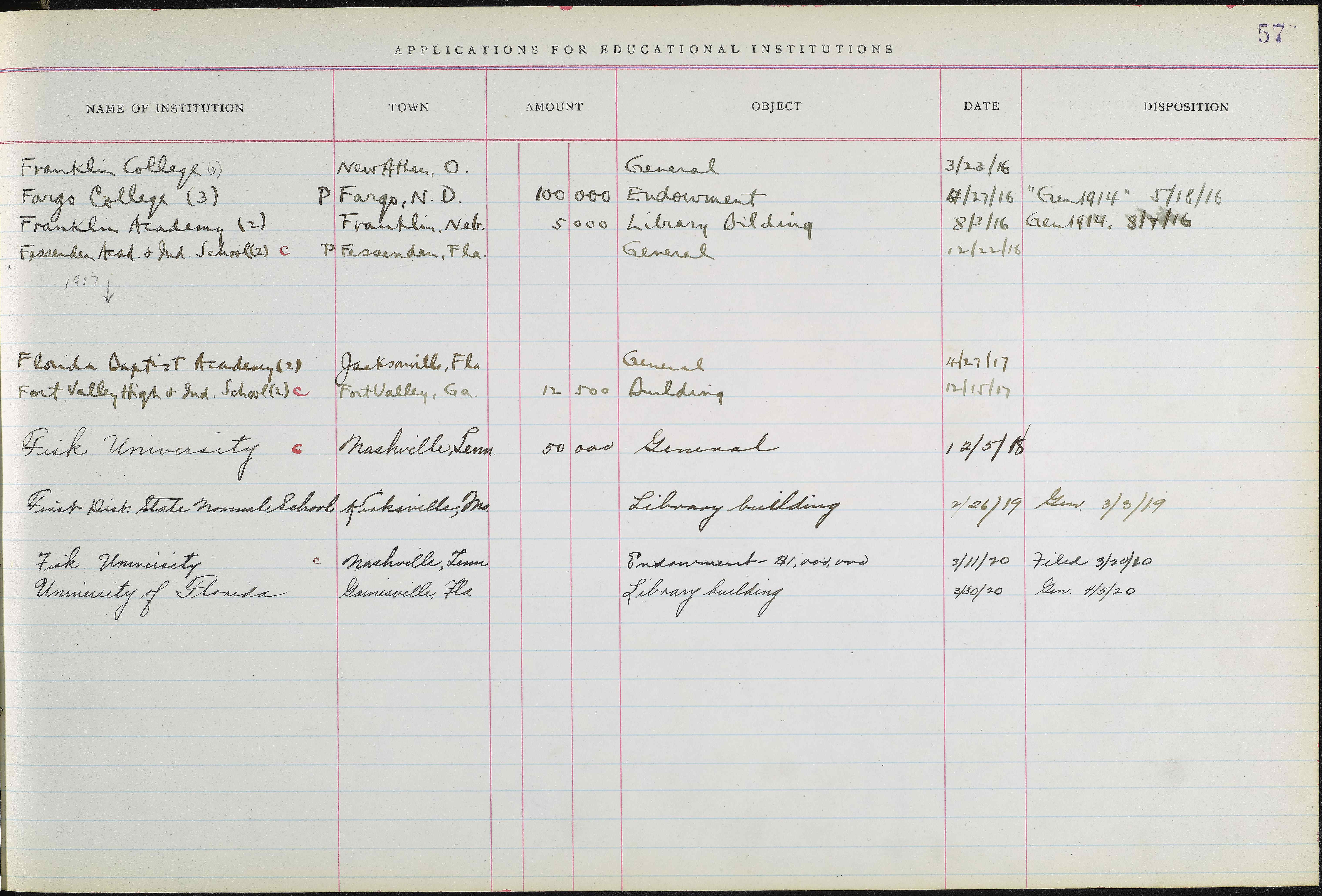
| Institution | Town | Amount | Object | Date | Disposition |
|---|---|---|---|---|---|
| Franklin College (6) | New Athen, O. | General | 3/23/16 | ||
| Fargo College (3) | Fargo, N.D. | 100,000 | Endowment | 4/27/16 | Gen 1914, 5/18/16 |
| Franklin Academy (2) | Franklin, Neb. | 5,000 | Library Building | 8/3/16 | Gen 1914, 8/7/16 |
| Fessenden Acad. & Ind. School | Fessenden, Fla. | General | 12/22/16 | ||
| Ferris Institute (2) | Big Rapids, Mich. | 50,000 | Buildings | 2/12/17 | |
| Findlay College (2) | Findlay, O. | 100,000 | Endowment | 5/23/17 | Gen 1914, 5/28/17 |
| Fairmount College | Wichita, Kan. | 200,000 | Endowment | 6/7/17 | 6/14/17 |
| Franklin College | Franklin, Ind. | 50,000 | General | 9/13/17 | Gen 1914, 9/17/17 |
| Fisk University | Nashville, Tenn. | 1,000,000 | Endowment | 6/14/18 | |
| Friends University | Wichita, Kan. | 200,000 | Endowment | 6/20/18 | Gen 1914, 8/8/18 |
See field extraction in action
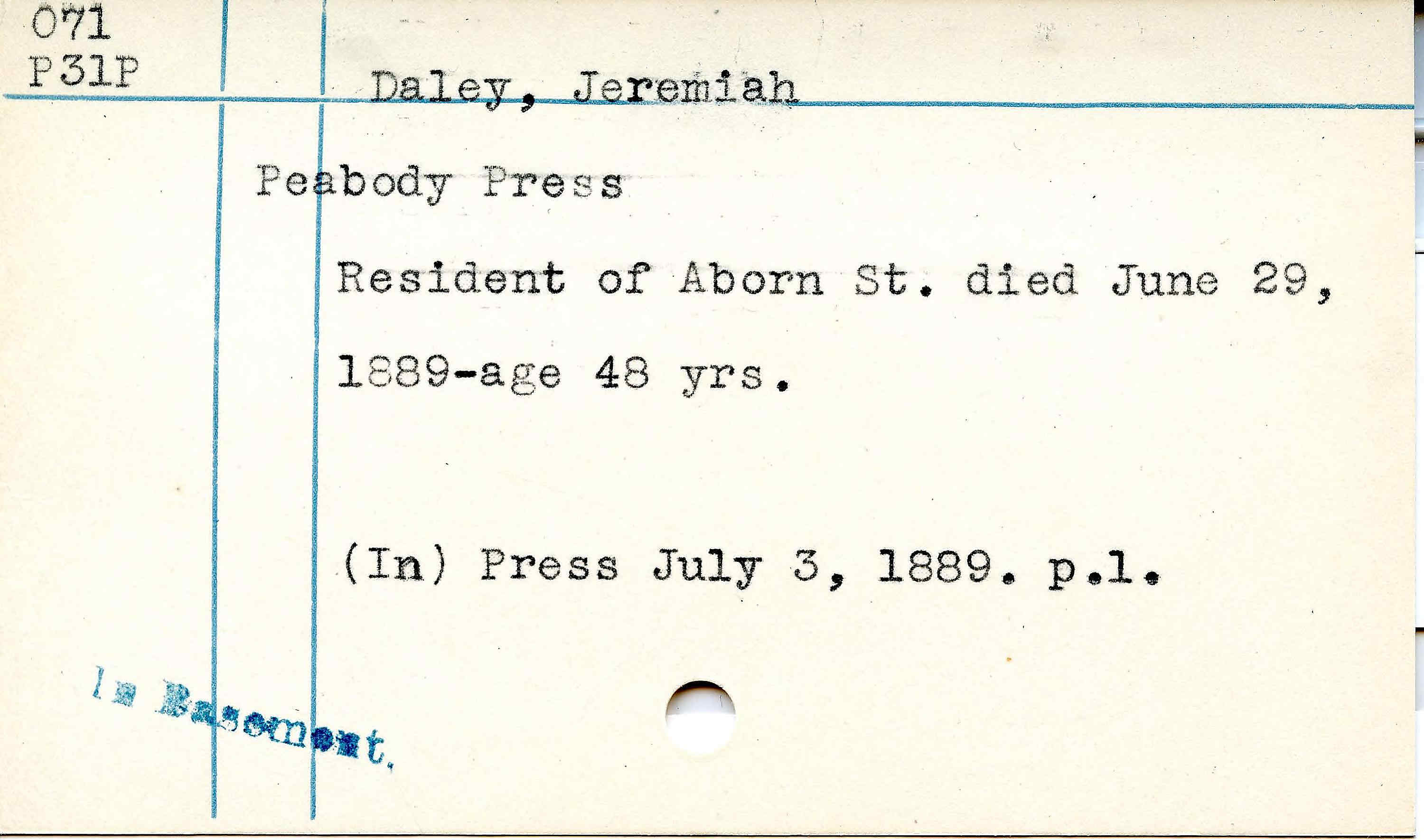
Field Models detect and extract specific data fields from documents — names, dates, locations, references — precisely and at scale. Train on your own form layouts for best results.
Intelligent Document Processing
From document images to research databases

Trainable
Train extraction models on your specific document type

Use Cases
What researchers extract with Transkribus

Handwriting specialists
The only IDP platform built for handwriting

Start extracting data from your documents
Create a free account. Upload your scans, run text recognition, and extract structured data — no coding, no ML expertise needed.