Atlas
Try the first pre-trained Smart Extract model
Drag an image here
Select a file...PNG or JPG up to 10 Mb
Structured output will appear here: text, tables, entities, page classes.
A new class of document recognition model
Smart Extract is a class of end-to-end models for document recognition. Where traditional pipelines chain separate stages – layout detection, baseline segmentation, text recognition – each passing errors to the next, a Smart Extract model takes a page image as input and produces structured output directly: text in reading order, layout regions, tables, named entities, and document metadata.
Atlas is the first generally available pre-trained Smart Extract model, trained on over 210,000 pages of ground truth in 27 languages. It serves as the base model for fine-tuning custom variants. The architecture behind it has been developed and validated across large-scale international projects, including historical museum object labels, real estate records, and healthcare documentation.
A Smart Extract model processes both the visual and the textual layer of a page at once. Because it sees where a line sits on the page while reading it, context that separate pipeline stages lose is preserved: a vertical line on a specimen label is often a date, a name tends to sit in the bottom corner. This is not a heuristic we programmed. It is what the model learns when layout and text are one task instead of three.
What you get back
Text & layout
Full reading order across columns and around images. Each region on the page is classified by type. Inline formatting is preserved.
Tables
Structured grids with rows, cells, and merged spans. Nested tables and tables of contents handled automatically.
Named entities
People, places, datetimes, and organisations tagged in place within the transcribed text – an entity inside a table cell is tagged where it stands, without losing its position in the structure.
Document classification
Language, type, orientation, and page layout identified for every page.
What Smart Extract can learn
The cards above show what Atlas returns. That list is not a feature set of Smart Extract. It is what this model was trained to produce.
Smart Extract models produce a fixed set of output types: page-level classes, transcribed text, nested structure elements, tables, text styles, and labels on text spans. Which classes, which elements, and which labels a model produces is not fixed. It is learned. A Smart Extract model learns its output from examples: anything that is recoverable from the page and consistently present in the training data can become part of the structured output. The technology does not distinguish between transcribing a word, reconstructing a table cell, tagging a person, or classifying a document type. All of it is one learned mapping from page image to structured result.
Anything recoverable from the page and consistent in the training data can be trained.
Atlas is one such mapping. It classifies pages by language and by type – printed, handwritten, or mixed – transcribes text in 27 languages, reconstructs nested layout including tables, and tags persons, places, datetimes, and organisations. A model trained on notarial registers could instead classify entries by act type, tag the parties by role, and mark amounts and occupations. None of these are features of the software. They are properties of the training data.
Two conditions bound what can be learned
The information must be recoverable from the page – either visible to a trained eye or inferable from linguistic and structural context. A category that requires outside knowledge cannot be learned.
It must be annotated consistently: the model learns the pattern between pages and their annotations, including any inconsistency in them.
Rule of thumb: if a person looking at the page cold could not make the classification, the model cannot learn it.
Atlas ships with one trained output structure, designed to cover historical and modern documents broadly. Fine-tuning can produce any output structure your data defines – whether layout markup or a structured data extraction schema.
Trained on 210,191 pages
All 24 official EU languages, plus Ukrainian, Russian, and Norwegian. Printed and handwritten, modern and historical.
Type
Period
250,000 specimen labels, Museum für Naturkunde Berlin
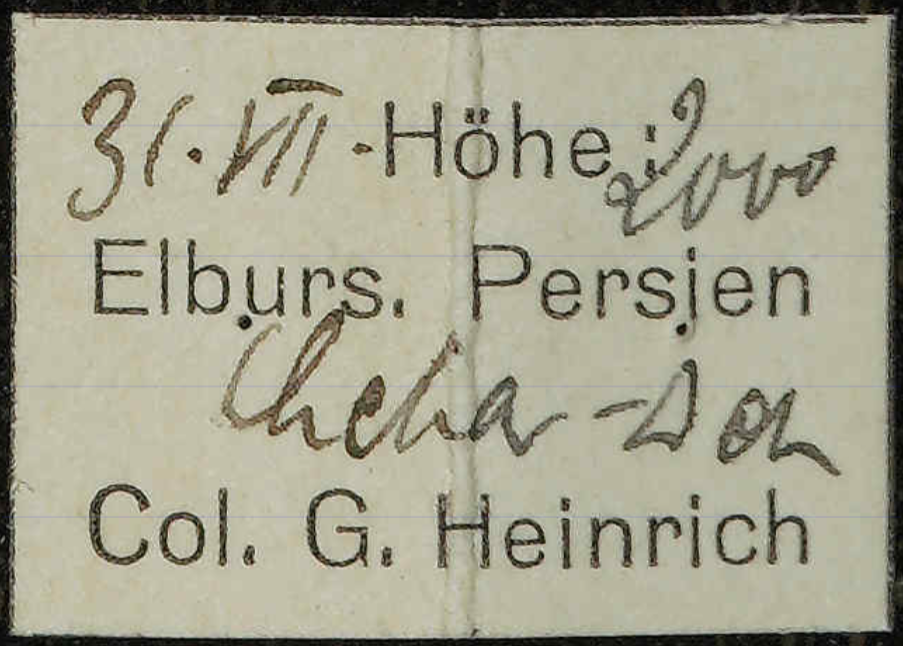
The museum needed 250,000 insect specimen labels transcribed: handwritten and printed lines mixed on the same label, vertical text next to horizontal, scientific terms and historical place names throughout. The conventional pipeline did not reach the quality the project needed. A single end-to-end model, fine-tuned on 5,000 labels by the museum’s own specialists, did.
All 250,000 labels were transcribed and tagged with named entities. Collection locations were enhanced with external entity reference databases so that ambiguous place names resolve to real coordinates. It was the first Smart Extract model in production. Atlas is its generalisation.
Learned entity types
16 domain-specific entity types in total, fine-tuned on 5,000 labelled pages
Performance and current limitations
Atlas processes a typical document page in a few seconds – around five times faster than our classic multi-stage pipeline on the same hardware. It is a compact, specialised model: it runs on a single GPU, handles documents of any length, and every page is processed on READ-COOP’s own servers in Austria.
In deployed research projects, fine-tuned Smart Extract models typically reach between 85 and 95 percent end-to-end accuracy – layout, transcription, and structure evaluated together, not transcription alone. The range depends on document complexity and available training data. Detailed benchmarks will be published at the Transkribus User Conference in September.
Coordinate-level output – bounding boxes for regions and lines – is not included in Atlas. Coordinates can be learned through fine-tuning when present in the training data. Dense pages beyond roughly 2,000 words are outside the current training range.
Customise Atlas for your material
Coming soon
Atlas is the starting point. Fine-tune it on your own material to create a custom output schema – your own elements, entity types, and data fields. Whatever you can consistently label on a page, the model can learn to produce.
Training data is prepared directly in the Transkribus interface. The self-service workflow will support training sets of 100 to 2,000 pages. For larger collections, our managed projects team trains and validates custom models at any scale.
Fine-tuning will initially be available for selected projects. Interested? Get in touch to discuss your use case.
Passau, September 21–23
API access and self-service fine-tuning are on the way. The technology, the roadmap, and live demonstrations of custom Smart Extract models premiere at the conference.